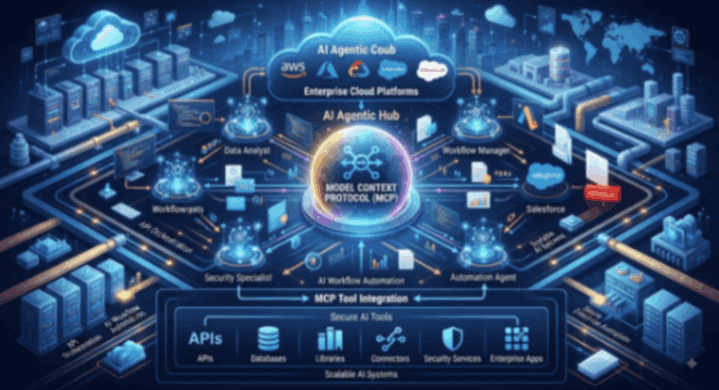
The Model Context Protocol (MCP) is an open standard (originally introduced by Anthropic in late 2024) that standardizes how AI agents and applications discover, authorize, and invoke external tools, data sources (resources), and prompt templates. It solves the N×M integration problem: instead of writing custom connectors for every agent framework × every backend service, each side implements MCP once.
Think of it as a USB-C port for AI agents—consistent discovery, invocation, authentication, and observability across tools.
Core MCP Concepts (2026 Spec)
Architecture roles:
- MCP Host: The AI application or agent runtime (e.g., Claude, Gemini CLI, Bedrock AgentCore Runtime, Foundry Agent Service, Vertex AI Agent Engine, or a custom LangGraph/CrewAI app).
- MCP Client: Component inside the host that maintains the connection to one or more MCP servers.
- MCP Server: Lightweight program (or managed service) that exposes capabilities from a backend system (APIs, databases, cloud services, SaaS tools, etc.).
Core primitives servers can expose:
- Tools: Executable functions the agent can call (e.g., query_bigquery, create_jira_ticket, list_s3_buckets).
- Resources: Readable contextual data (files, database records, schemas, API responses).
- Prompts: Reusable templated instructions or workflows.
Protocol evolution (important in 2026):
- Earlier versions used a session-oriented handshake (initialize / initialized) and session IDs.
- The 2026-07-28 specification (widely adopted) made MCP largely stateless. Every request is self-describing (protocol version and capabilities travel in headers/_meta). This enables ordinary HTTP load balancing, serverless scale-to-zero, and simpler horizontal scaling. Server-initiated interactions (elicitation, sampling) use a multi-round-trip pattern when needed.
Communication is primarily JSON-RPC over Streamable HTTP (remote) or stdio (local). Major SDKs exist for TypeScript, Python, Go, C#, etc.
Why MCP Matters for Cloud Agent Infrastructure
Without MCP, every new tool requires custom function-calling schemas, authentication glue, error handling, and observability. With MCP:
- Agents dynamically discover tools (tools/list).
- Gateways can aggregate many backends into one unified MCP endpoint.
- Security (inbound/outbound auth), rate limiting, auditing, and policy enforcement can be centralized.
- The same tools work across different agent frameworks and cloud runtimes.
Cloud Platform MCP Integrations (2026)
1. AWS – Amazon Bedrock AgentCore Gateway (Most Mature Managed Gateway)
AgentCore Gateway is a fully managed AI gateway that turns existing assets into MCP-compatible tools and acts as a secure entry point for agentic traffic.
Key capabilities:
- Converts Lambda functions, OpenAPI/Smithy specs, API Gateway REST APIs, and existing MCP servers into MCP tools.
- Supports aggregation: multiple targets appear as one unified MCP server to the agent.
- Dual authentication model:
- Inbound: Controls who/what can call the gateway (IAM, OAuth/JWT, Cognito, etc.).
- Outbound: Gateway authenticates to backends on behalf of the agent/user (IAM roles, OAuth 3-legged, secrets).
- Supports MCP versions including the stateless 2026-07-28, 2025-11-25, and earlier.
- Built-in semantic search for tools, progress notifications, elicitation, and sampling.
- 1-click integrations for popular SaaS (Salesforce, Slack, Jira, Asana, Zendesk, etc.).
- Observability via CloudWatch + OpenTelemetry; full audit of tool calls.
- AWS also maintains 60+ official MCP servers covering documentation, infrastructure, containers, data, cost, AI/ML, etc.
Typical flow:
- Create Gateway → configure inbound auth.
- Add targets (Lambda, OpenAPI, MCP server, etc.).
- Agent (any framework) connects to the Gateway URL as an MCP client.
- Agent calls tools/list → gets unified catalog → invokes tools securely.
Example use: An agent running on AgentCore Runtime or externally uses the Gateway to call internal Lambda-backed tools and external SaaS without managing protocol details or credentials itself.
2. Microsoft Azure – Foundry Agent Service + Azure Functions / Container Apps
Foundry Agent Service acts as a first-class MCP client.
How it works:
- You add remote MCP server endpoints as tools to a Foundry agent (via portal, SDK, or REST).
- Provide server_url + unique server_label (optional allowed_tools filter).
- Supported auth: Key-based, Microsoft Entra (project or agent managed identity), OAuth On-Behalf-Of (OBO), or unauthenticated.
- Agents can connect to multiple MCP servers simultaneously.
- Azure Functions has native MCP extension support; the webhook endpoint (/runtime/webhooks/mcp) becomes a remote MCP server.
- You can also host custom MCP servers on Azure Container Apps and connect them.
- Toolbox feature lets you curate a set of tools and expose them via a single MCP-compatible endpoint.
- Enterprise controls: content filters, XPIA mitigation, private networking options, full tracing.
Limitations to note: Non-streaming tool calls have a ~100-second timeout; private MCP servers inside a VNet have some restrictions depending on setup mode.
3. Google Cloud – Managed Remote MCP Servers + Agent Engine / ADK
Google offers the largest set of fully managed, remote MCP servers for its own services (50+ and growing).
Highlights:
- Stable endpoints (e.g., *.googleapis.com/mcp patterns) for BigQuery, Google Maps (Grounding Lite), Compute Engine, GKE, AlloyDB/Cloud SQL/Spanner, Firestore, Bigtable, Developer Knowledge, and many more.
- Enterprise features: Cloud IAM for access control, VPC Service Controls, Model Armor (defense against prompt injection/exfiltration), Audit Logging, Agent Registry for discovery and governance.
- Toolsets allow selecting a subset of tools from a server to avoid context bloat.
- Apigee integration lets you turn your own (or third-party) APIs into governed MCP servers and publish them into the Cloud API Registry / Agent Registry.
- Vertex AI Agent Engine and Agent Development Kit (ADK) natively support MCP toolsets.
- Agents can use Google-managed servers, custom servers on Cloud Run, or third-party MCP servers.
- Supports the evolving MCP specs, including stateless updates for better serverless scaling.
Example: An ADK agent on Agent Engine can use McpToolset pointed at a Google Maps MCP endpoint or a custom Cloud Run MCP server, with Workload Identity for auth.
Comparison Snapshot
| Aspect | AWS AgentCore Gateway | Azure Foundry Agent Service | Google Cloud Managed MCP Servers |
|---|---|---|---|
| Primary role | Managed gateway + aggregator | MCP client (connects to servers) | Managed remote servers + registry |
| Official servers | 60+ AWS service servers | Azure MCP Server + Functions | 50+ Google/Google Cloud services |
| Auth model | Strong inbound + outbound | Entra / OBO / managed identity | Cloud IAM + Model Armor |
| Aggregation | Excellent (unified virtual server) | Multiple servers per agent | Toolsets + Registry |
| Hosting your own | Lambda, containers, existing MCP | Functions, Container Apps | Cloud Run, Apigee, custom |
| Stateless support | Yes (2026-07-28) | Supported | Strong focus on serverless |
| Best for | Complex internal + SaaS tool meshes | Microsoft ecosystem + custom tools | Google services + data-centric agents |
Best Practices for MCP Tool Integration
- Prefer remote/managed servers for production — easier scaling, auth, and governance than local stdio servers.
- Curate toolsets — Do not dump dozens of tools into every agent context; use filtering, semantic search, or toolsets.
- Least privilege + outbound auth — Let the gateway or platform handle credentials; never embed long-lived secrets in the agent.
- Observability first — Ensure every tools/call is traced with arguments, results, latency, and identity.
- Version and test — MCP servers and tool schemas change; maintain golden evaluation datasets for tool selection accuracy.
- Security layers — Combine MCP-level auth with platform guardrails, network isolation, and content filtering.
- Start simple — Connect one high-value managed server (e.g., BigQuery, internal Lambda, or a SaaS connector), instrument it, then expand.
Practical Getting-Started Paths
- AWS: Create an AgentCore Gateway → add a Lambda or OpenAPI target → connect any MCP-compatible agent.
- Azure: Deploy MCP server on Functions or Container Apps → add the endpoint as an MCP tool in Foundry Agent Service.
- Google: Point an ADK or Agent Engine agent at a managed *.googleapis.com/mcp endpoint or a Cloud Run custom server; use Agent Registry for governance.
MCP has become the de-facto standard for tool connectivity in production agentic systems. The hyperscalers have invested heavily in managed gateways, official servers, and enterprise controls, so most teams no longer need to build the protocol layer themselves. Focus instead on tool design quality, authorization boundaries, and observability of the agent–tool interaction loop.